Problem z ugprade VMware Update Manager z 5.5 do 6.0

VMware

Od czasu do czasu podczas upgrade “update manager” pojawia się problem. Zwykle jest to problem nie z samym programem VMware ale albo ze źle skonfigurowanym (czytaj nie tym) sterownikiem odbc albo problemem z upgrade bazy danych.

Czyli, po pierwsze, odbc musi być 32-bit. To właściwie jedyna rzecz którą trzeba pamiętać, dalsza konfiguracja jest banalna.


W sprawie podnoszenia samej bazy danych.

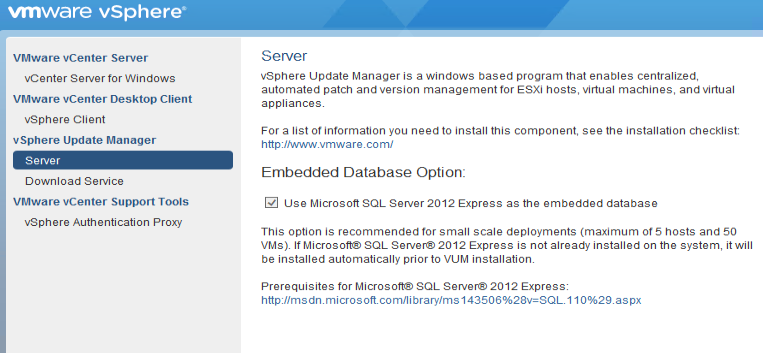
  1. sprawdzić, czy system spełnia wszystkie wymagania: https://docs.microsoft.com/en-us/previous-versions/sql/sql-server-2012/ms143506(v=sql.110)
  2. jeśli dalej brakuje pomysłu, to najelepiej jest uruchomić instalator mssql z palca, znajduje się w katalogu <cdrom>\redist\SQLEXPR. MSSQL przed samym uruchomieniem ma wizard który weryfikuje problemy z systemem. Zwykle trzeba spełnić wymagania tego wizarda (np. wymagany restart systemu) żeby później uruchomić bez problemu upgrade VUM.

Po dłuższym czasie powinniśmy dostać poniższy komunikat:


Aktualizator nie sprawdza również uprawnień użytkownika za pomocą którego ma się podłączyć do vCenter. Wtedy możemy dostać następujący błąd:

Należy wówczas sprawdzić uprawnienia użytkownika w vCenter i uruchomić aktualizację (ponowić) z <cdrom>\updateManager.


Zwróćcie również uwagę na poniższy screen. Zwykle chodzi nam o “do not overwrite”


No Comments

Leave a Reply

Your email address will not be published. Required fields are marked *

This site uses Akismet to reduce spam. Learn how your comment data is processed.

VMware
VCF, backup configuration

Backup implementation for VMware component is fairly easy. Just the requirements is to configure SFTP server in proper way and make it network available to the VMware components. SDDC Manager and NSX Manager backup In VCF Operations it is possible to configure backup for SDDC Manager and NSX Manager. Go …

VMware
VCF Automation, fresh environment configuration with identity providers and access control.

Introduction Login Login as user admin to the Organization name: system or if selected manual: Check the connections (in Administration section), where you should see connection to the vCenter and NSX-t manager as those are provided automatically via VCF Operations: the same for VCF Instances: Also check your networking: Identity …

VMware
VCF SoS

SoS (Supportability and Serviceability) command can be used for troubleshooting purpose to generate VCF (per component) log bundle, massively enable/disable ssh service on ESXi, vCenter, password and certificates expiry status, verify cluster health and many other. while troubleshooting, the following commands can be helpful:
